WorkDial
Pricing Help Articles Blog Contact
Request a Demo Start a Trial Start a Trial

Functional Docs

  • Conference & Call Transfer
  • WorkDial Dashboard – Complete User Guide
  • Mobile Call Feature – Simple & Detailed Explanation
  • Smart Panel (Agent Workspace)
  • In-Call Controls (Mute, Hold, Transfer, Conference)
  • Taking Notes & Call Dispositions
  • Sending SMS/MMS During a Call
  • Accessing Related Records During Calls
  • Routing Methods in WorkDial
  • Business Hours & Out-of-Hours Routing
  • Offline Routing Scenarios
  • IVR Setup & Logs
  • Creating a Batch Call List
  • Explore WorkDial Smart Dialer

Get Started

  • Subscription Purchase and Management Guide (Step-by-Step)
  • Setup
    • 1. Package Installation
    • 2. Twilio Signup, Account Upgrade, and Number Acquisition
    • 3. Connect Twilio and WorkDial in Salesforce
    • 4. Users Assignment at Call Centre 
    • 5. Add the Dialer to the App Menu (Utility Window)
  • Basic Configuration
    • CTI Number Setup Guide (Using Twilio Integration)
    • CTI Number Setup Guide (Step-by-Step)
    • Batch Calling Setup and Usage Guide
    • Call Settings
    • Country & Number Configuration
    • Business Hours & Offline Routing
    • Object Preferences for Incoming Calls
    • Caller ID & Name Field Configuration
    • General Settings
    • How to Add the CTI Dialer
    • Smart Panel — Your Complete Salesforce CTI Dialer Interface
View Categories
  • Home
  • Docs
  • Get Started
  • Basic Configuration
  • How to Add the CTI Dialer

How to Add the CTI Dialer

< 1 min read

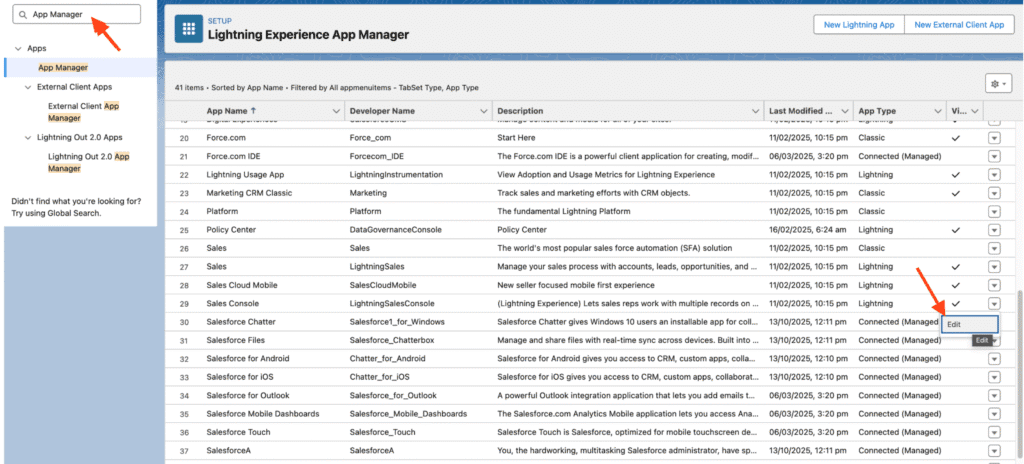
 Step 1: Go to Setup → In the Quick Find box, search for “App Manager.”
Step 2: Locate the app where you want to add the dialer and click Edit.

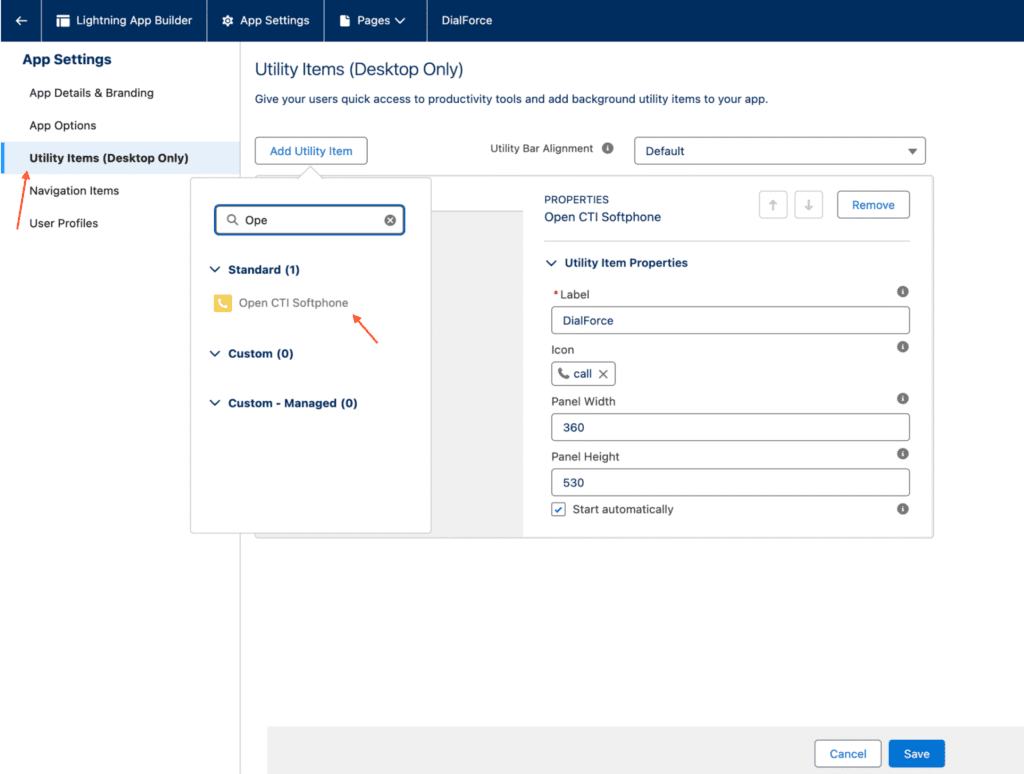
 Step 3: In the Utility Items tab, click Add Utility Item and select “Open CTI Softphone.”
Step 4: Set the following options:

  • Label: (enter your preferred name)
  • Panel Width: 360
  • Panel Height: 530
  • Check the box for “Start Automatically.”

 Step 5: Click Save to complete the setup.

What are your Feelings

Share This Article :

  • Facebook
  • X
  • LinkedIn
  • Pinterest
Still stuck? How can we help?

How can we help?

Updated on February 27, 2026
General SettingsSmart Panel — Your Complete Salesforce CTI Dialer Interface
DialForce Logo Icon (Purple)

WorkDial

WorkDial is the only 100% native CTI built for Salesforce. Trusted by Sales, Support, and RevOps teams to power secure, real-time conversations directly inside Salesforce.

thank you
thank you
WorkDial
  • Product
  • Pricing Page
  • Help Articles
  • Blog
  • Contact
  • Request a Demo
Terms and Policies
  • Terms of Service
  • Privacy Policy
  • Cookie Policy
Contact Us
support@workdial.io
sales@workdial.io
Follow Us
Linkedin Youtube

1st Flr,Flat No.103,DNo8-4-300/1/A, Tower-B,Kalpataru Residency,,

Hyderabad, Telangana, 500018