WorkDial
Pricing Help Articles Blog Contact
Request a Demo Start a Trial Start a Trial

Functional Docs

  • Conference & Call Transfer
  • WorkDial Dashboard – Complete User Guide
  • Mobile Call Feature – Simple & Detailed Explanation
  • Smart Panel (Agent Workspace)
  • In-Call Controls (Mute, Hold, Transfer, Conference)
  • Taking Notes & Call Dispositions
  • Sending SMS/MMS During a Call
  • Accessing Related Records During Calls
  • Routing Methods in WorkDial
  • Business Hours & Out-of-Hours Routing
  • Offline Routing Scenarios
  • IVR Setup & Logs
  • Creating a Batch Call List
  • Explore WorkDial Smart Dialer

Get Started

  • Subscription Purchase and Management Guide (Step-by-Step)
  • Setup
    • 1. Package Installation
    • 2. Twilio Signup, Account Upgrade, and Number Acquisition
    • 3. Connect Twilio and WorkDial in Salesforce
    • 4. Users Assignment at Call Centre 
    • 5. Add the Dialer to the App Menu (Utility Window)
  • Basic Configuration
    • CTI Number Setup Guide (Using Twilio Integration)
    • CTI Number Setup Guide (Step-by-Step)
    • Batch Calling Setup and Usage Guide
    • Call Settings
    • Country & Number Configuration
    • Business Hours & Offline Routing
    • Object Preferences for Incoming Calls
    • Caller ID & Name Field Configuration
    • General Settings
    • How to Add the CTI Dialer
    • Smart Panel — Your Complete Salesforce CTI Dialer Interface
View Categories
  • Home
  • Docs
  • Functional Docs
  • Explore WorkDial Smart Dialer

Explore WorkDial Smart Dialer

1 min read

WorkDial Smart Dialer is your all-in-one Salesforce-native calling workspace, helping you manage calls, track performance, and stay connected. Here is a quick overview of each section inside WorkDial.

Home Section #

Get a snapshot of your overall call performance in one view.
See Total Calls, Answered, Missed, Transferred, and Conference Calls specific to your activity.

Key features:

  • Status Filter: Set your availability (Available, Busy, Offline).
  • Time Filter: Filter insights by custom time ranges.
  • View Complete Dashboard: Open a detailed analytics view with advanced filters.

Phone Section #

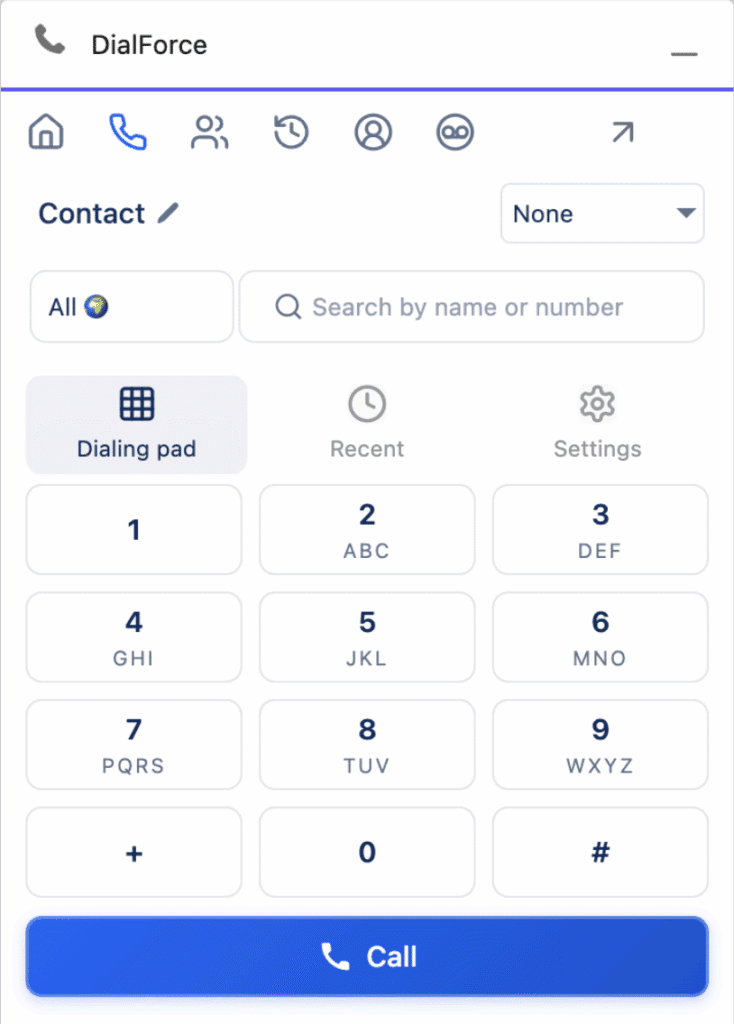
Your main dialer interface where calling happens.

Key features:

  • Object Filter: Helps to search records or type a phone number to see matching Salesforce records.
  • CTI Number Filter: Choose your assigned business number for outbound calls.
  • Country Code Selector: Pick the correct country code before dialing.
  • Dialpad: Enter numbers and start calls.
  • Recent Calls: Quick access to your last 20 calls.
  • Settings: Configure options like Auto Answer, Skip Business Hours for Call Forwarding, Offline Routing Number, post-call panel preference, and bell notification preference.
    Tip: For the full list, see the detailed Settings documentation. [Click here]

Batch Calling Section #

Run outreach with batch calling.
Call multiple leads or contacts sequentially from a predefined list.
Manage list status (Active or Inactive) and monitor progress.
Learn more about batch calling [Click here].

Call Logs Section #

View all call logs, including inbound, outbound, missed, and transferred.
Use filters to search, sort, and analyze by user, date, or status.

Team Online Section #

View your team members’ active status and also you can make a call to your team.

Voicemails Section #

See all incoming voicemails with playback and filtering options so you can follow up quickly.

What are your Feelings

Share This Article :

  • Facebook
  • X
  • LinkedIn
  • Pinterest
Still stuck? How can we help?

How can we help?

Updated on February 27, 2026
Creating a Batch Call ListConference & Call Transfer
Table of Contents
  • Home Section
  • Phone Section
  • Batch Calling Section
  • Call Logs Section
  • Team Online Section
  • Voicemails Section
DialForce Logo Icon (Purple)

WorkDial

WorkDial is the only 100% native CTI built for Salesforce. Trusted by Sales, Support, and RevOps teams to power secure, real-time conversations directly inside Salesforce.

thank you
thank you
WorkDial
  • Product
  • Pricing Page
  • Help Articles
  • Blog
  • Contact
  • Request a Demo
Terms and Policies
  • Terms of Service
  • Privacy Policy
  • Cookie Policy
Contact Us
support@workdial.io
sales@workdial.io
Follow Us
Linkedin Youtube

1st Flr,Flat No.103,DNo8-4-300/1/A, Tower-B,Kalpataru Residency,,

Hyderabad, Telangana, 500018