
WorkDial
Pricing Help Articles Blog Contact
Request a Demo Start a Trial Start a Trial

Functional Docs

  • Conference & Call Transfer
  • WorkDial Dashboard – Complete User Guide
  • Mobile Call Feature – Simple & Detailed Explanation
  • Smart Panel (Agent Workspace)
  • In-Call Controls (Mute, Hold, Transfer, Conference)
  • Taking Notes & Call Dispositions
  • Sending SMS/MMS During a Call
  • Accessing Related Records During Calls
  • Routing Methods in WorkDial
  • Business Hours & Out-of-Hours Routing
  • Offline Routing Scenarios
  • IVR Setup & Logs
  • Creating a Batch Call List
  • Explore WorkDial Smart Dialer

Get Started

  • Subscription Purchase and Management Guide (Step-by-Step)
  • Setup
    • 1. Package Installation
    • 2. Twilio Signup, Account Upgrade, and Number Acquisition
    • 3. Connect Twilio and WorkDial in Salesforce
    • 4. Users Assignment at Call Centre 
    • 5. Add the Dialer to the App Menu (Utility Window)
  • Basic Configuration
    • CTI Number Setup Guide (Using Twilio Integration)
    • CTI Number Setup Guide (Step-by-Step)
    • Batch Calling Setup and Usage Guide
    • Call Settings
    • Country & Number Configuration
    • Business Hours & Offline Routing
    • Object Preferences for Incoming Calls
    • Caller ID & Name Field Configuration
    • General Settings
    • How to Add the CTI Dialer
    • Smart Panel — Your Complete Salesforce CTI Dialer Interface
View Categories
  • Home
  • Docs
  • Get Started
  • Setup
  • 2. Twilio Signup, Account Upgrade, and Number Acquisition

2. Twilio Signup, Account Upgrade, and Number Acquisition

2 min read

Introduction #

Welcome to this detailed guide for signing up at Twilio, upgrading your account, and buying a number! 

Step-by-Step Instructions

  • Access Twilio Console
    • Open your web browser and go to console.twilio.com. 
  • Sign Up or Log In
    • If you have an account, click the “Log In” button and enter your credentials.
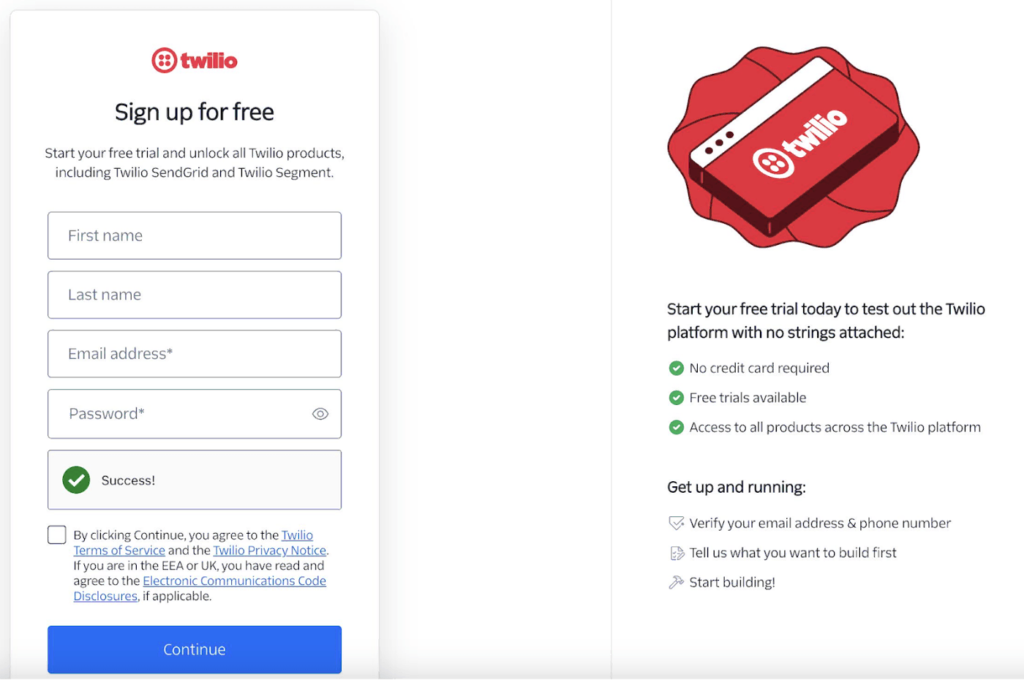
If you have an account, click the “Log In” button and enter your credentials.

  • Navigate to Homepage
    • After signing in, observe the Twilio homepage with your dashboard.
  • Upgrade to a Paid Account
    • Click “Admin” in the top-right dropdown menu.
    • Click “Account Management” from the options.
    • Follow the payment prompts, enter your payment details, and click “Submit” to upgrade.

Note: You need to upgrade in two places , one at Twilio and another in the WorkDial app on Salesforce. Twilio manages your call costs, while WorkDial manages your app licenses.

Phone Numbers Configuration: #

  • Access Phone Numbers
    • On the left-hand side, click “Phone Numbers” under the Account dashboard.
    • If not visible, click “Explore Products,” find “Phone Numbers,” and pin it to the left panel.
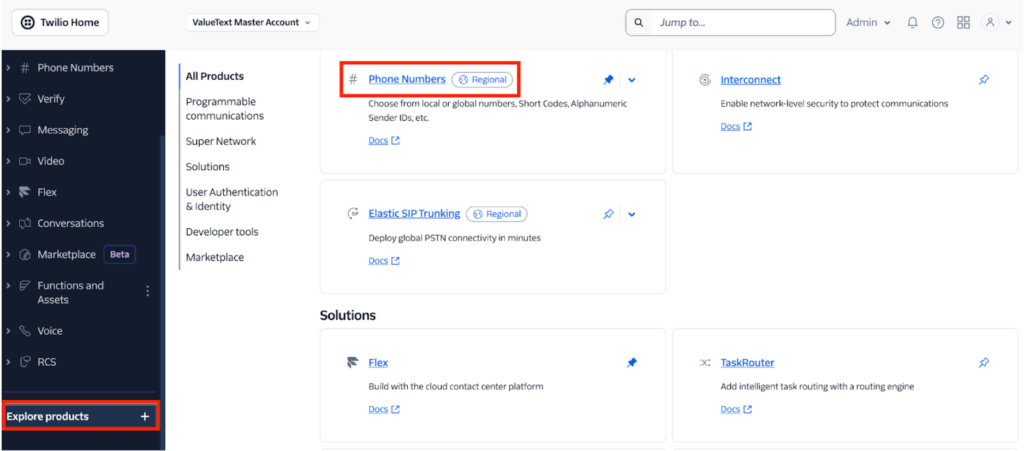
  • Buy a Number 
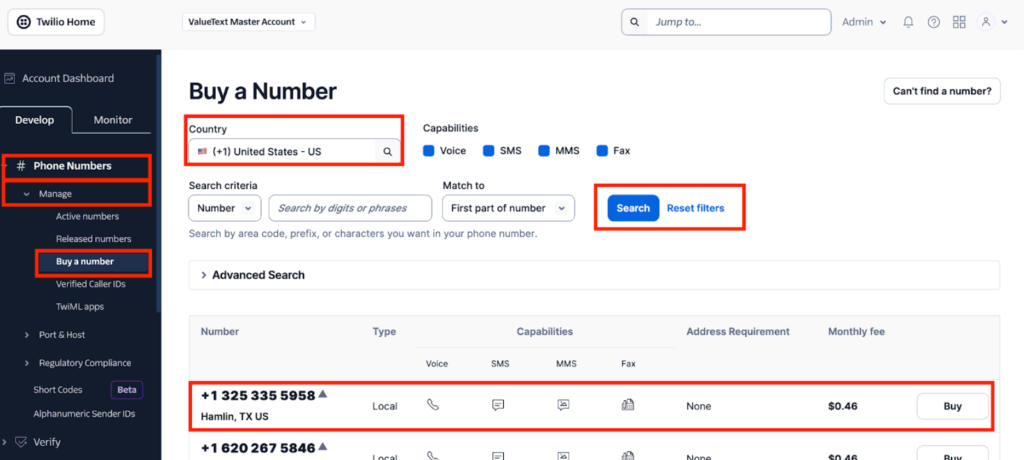
    • Under “Phone Numbers,” click “Manage” then “Active Numbers” to view purchased, porting, and hosting numbers.
    • Click “Buy a Number” from the “Phone Numbers” menu.
    • Enter a country (e.g., USA) or a prefix (e.g., +1202) in the search bar, then click Search. If no numbers are available for your selected country, please refer to Twilio’s guide onhttps://help.twilio.com/articles/223183068-Twilio-international-phone-number-availability-and-their-capabilities
    • Browse the list of available numbers and review their capabilities (Voice, SMS, MMS, Fax). When selecting a number, ensure it has Voice capability. If you also plan to configure the same number in ValueText for SMS, make sure it includes SMS capability as well.
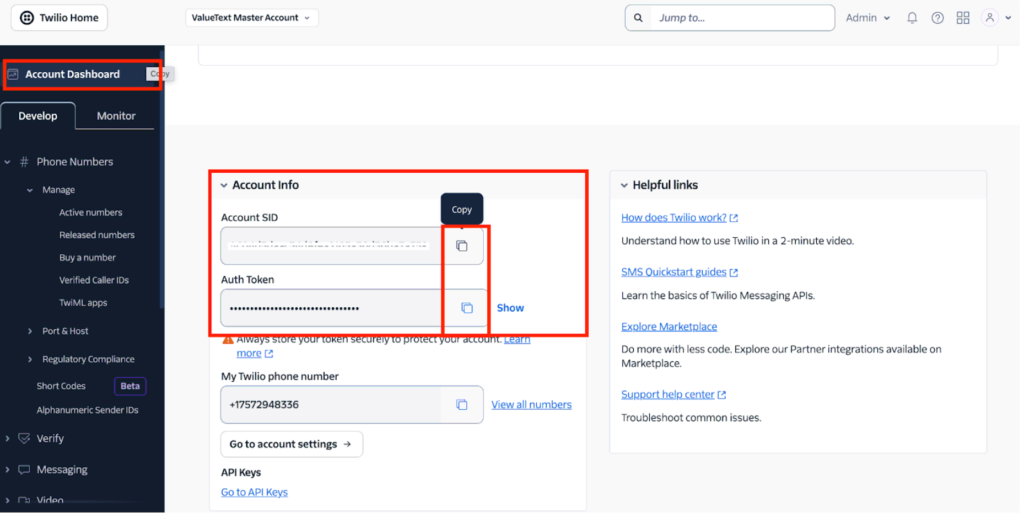
Copy Account Sid & Auth Token #

Account Sid & Auth Token will be used in Salesforce, similar to a username and password, so please keep them secure.

You can find your Twilio details on the Twilio Console homepage by scrolling down under the Account Info section.
✅ Next Step: Connect Twilio and WorkDial in Salesforce.

What are your Feelings

Share This Article :

  • Facebook
  • X
  • LinkedIn
  • Pinterest
Still stuck? How can we help?

How can we help?

Updated on February 27, 2026
1. Package Installation3. Connect Twilio and WorkDial in Salesforce
Table of Contents
  • Introduction
  • Phone Numbers Configuration:
  • Copy Account Sid & Auth Token
DialForce Logo Icon (Purple)

WorkDial

WorkDial is the only 100% native CTI built for Salesforce. Trusted by Sales, Support, and RevOps teams to power secure, real-time conversations directly inside Salesforce.

thank you
thank you
WorkDial
  • Product
  • Pricing Page
  • Help Articles
  • Blog
  • Contact
  • Request a Demo
Terms and Policies
  • Terms of Service
  • Privacy Policy
  • Cookie Policy
Contact Us
support@workdial.io
sales@workdial.io
Follow Us
Linkedin Youtube

1st Flr,Flat No.103,DNo8-4-300/1/A, Tower-B,Kalpataru Residency,,

Hyderabad, Telangana, 500018