
live
Salesforce
The platform WorkDial runs inside. Every call is a native object, governed by your flows and permissions.
A pipeline you can trust
Synced tools hand you a call log that argues with your CRM: totals that do not match, records that lag an hour behind. WorkDial calls become Salesforce records the second they end, so your pipeline report is the call report. Nothing to reconcile.
Salesforce · Twilio transport · WhatsApp · ValueText
WorkDial is a Salesforce-native CTI platform. It writes every call as a native Call__c object the instant it ends, with the transcript on Transcript__c, the AI sentiment score on Sentiment__c, and the recording reference on Recording__c. You report on them in the Salesforce report builder, trigger Flow from them directly, and govern them with the sharing and field-level security you already run. Nothing syncs in, so there is nothing to reconcile.
The objects
Every call produces four records inside your Salesforce org. They are standard native objects governed by your permissions, your flows, and your reports. No copy to sync, no second store to drift. For the VP who signs off on the number: this is why the pipeline report in your board deck is never a guess.
Call__c. The call record: direction, duration, outcome, and linked record. Exists from the moment the call ends. No manual entry.
Transcript__c. The full transcript, written to the record and queryable the moment transcription completes. Not a link to an external page.
Sentiment__c. The AI sentiment score, written directly to the record. Surfaceable in reports, dashboards, and flows without leaving Salesforce.
Recording__c. The recording reference. You choose where the audio lives: as native Salesforce Files in your own org, in your own Twilio, or in your own cloud storage. WorkDial keeps no copy of its own.
Native objects inherit your sharing rules, field-level security, and permission sets. No second data model to govern.
See the AI objectsAutomation
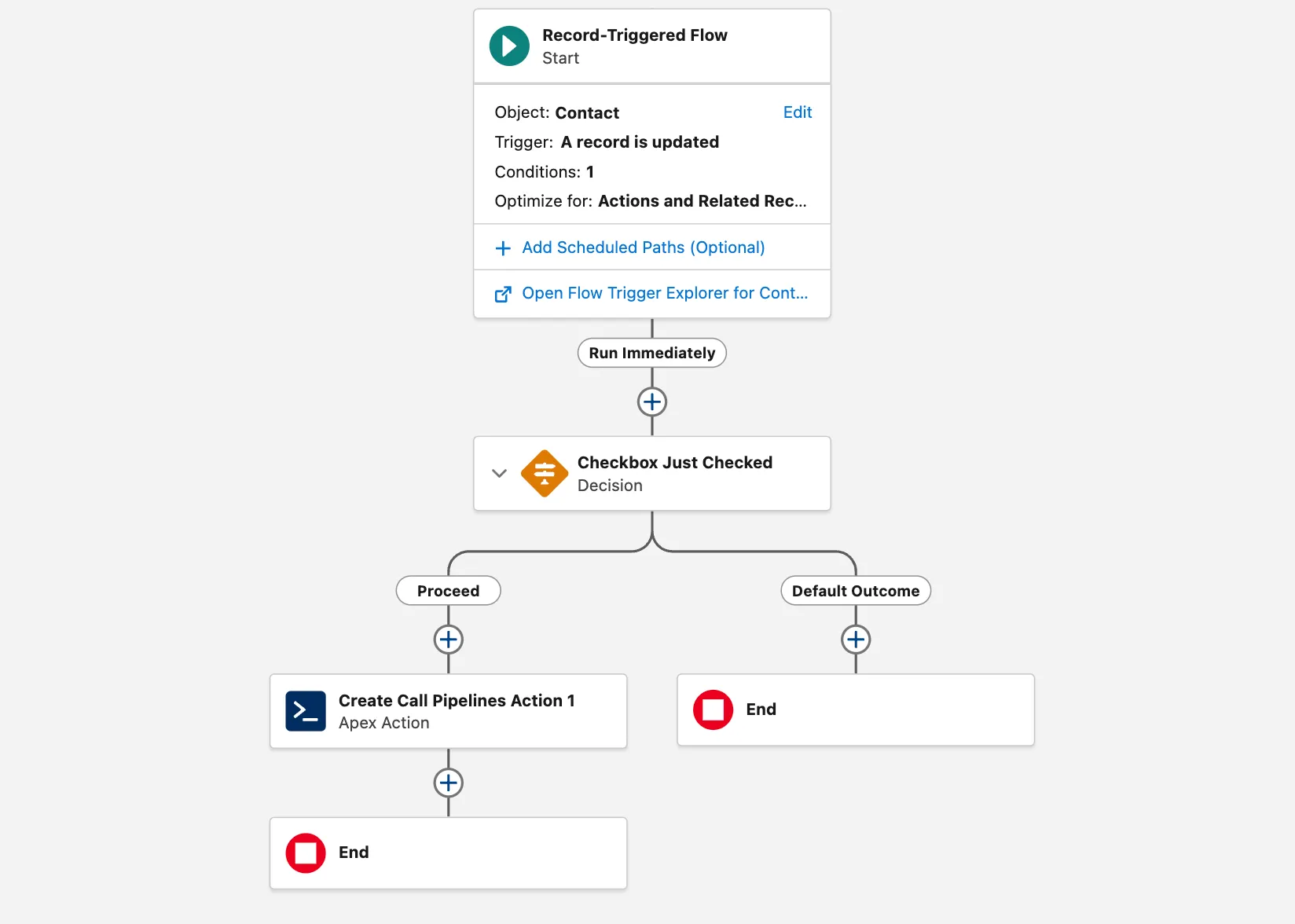
Because Call__c is native, any Flow fires the moment a call ends. No webhook, no middleware.
These are standard Salesforce flows on native objects. You write them in Flow Builder, in the org you already govern, with no new platform to learn.
Security and permissions
WorkDial adds no second permission model. Your existing Salesforce sharing rules and field-level security govern the call records and their linked objects. One audit surface, not two.
A rep sees the calls they own. A manager sees their team's calls. An admin sees everything. No configuration in WorkDial: it follows the Salesforce rules already in place.
Restrict the transcript or sentiment field to managers only. Hide the recording reference from profiles without review rights. Standard Salesforce FLS on native fields.
Salesforce field history and event monitoring cover the call objects the same way they cover any other record. There is no second vendor store to vet at audit time. See the full security posture.
Reporting
Because call records are native objects, every Salesforce Reports and Dashboards feature applies to them without any configuration or data export. Your pipeline report is already the call report.
Build a calls-by-outcome report the same way you build any Salesforce report. Call__c is a standard object in the report builder.
Cross-object reports work out of the box. Relate call volume to opportunity stage, account tier, or lead source because the relationships are native.
Sentiment trend dashboards run on Sentiment__c without any third-party analytics tool. The data is already there.
Your reports show what happened, not what got typed. Every call logs itself. The gap between calls placed and calls in the CRM is zero.
Synced tools leave data behind a vendor boundary your reports cannot cross. WorkDial's data is already inside, so they can.
See the dialerWhat it touches
WorkDial runs inside Salesforce, so this is a small grid, not a connector marketplace. Live tiles use the accent.
The platform WorkDial runs inside. Every call is a native object, governed by your flows and permissions.
Bring your own account. It carries the call at carrier rates with no markup, and the recordings stay in the account you own.
WhatsApp voice through the same layer as your calls, routed and logged identically inside Salesforce.
The Salesforce-native messaging layer from the same team. Together: the complete native stack.
The boundary
Call records and app logic are native Salesforce objects in your org. Recordings go where you choose: Salesforce Files, your own Twilio, or your own storage. WorkDial keeps no copy of its own.
Questions
Get started
4.97★ across 116 AppExchange reviews · from the team behind  ValueText, the Salesforce-native messaging platform